
Google Maps Scraper for ListingPro
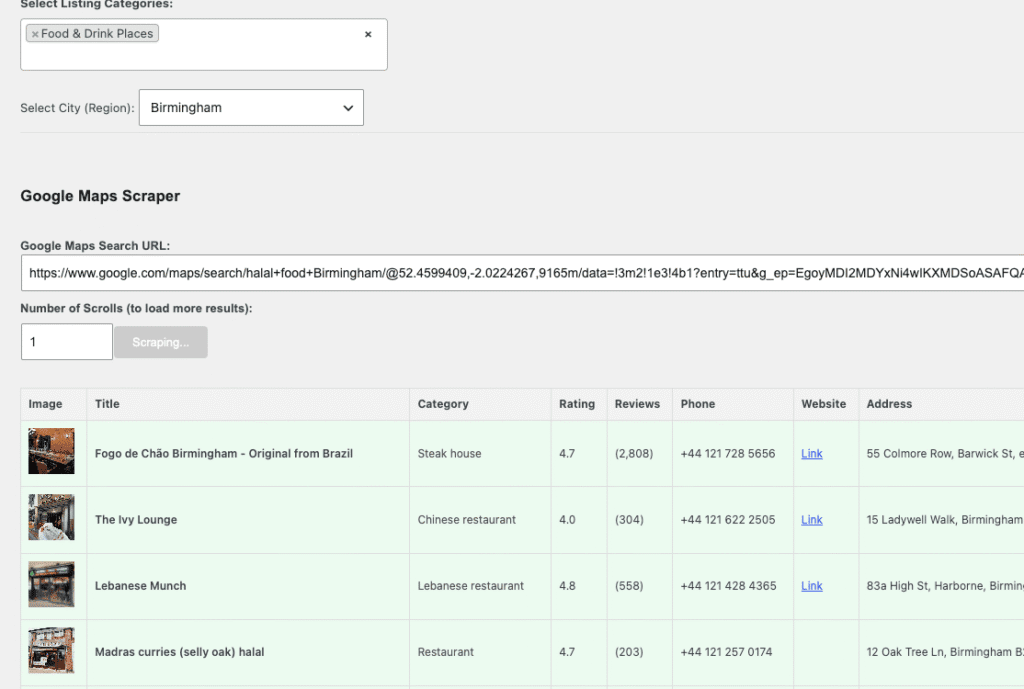
Google Maps Scraper for ListingPro is a powerful WordPress plugin that helps directory website owners collect business listing information and import it directly into the ListingPro directory theme. The plugin includes a self-hosted Google Chrome extension that can be downloaded from the WordPress admin panel and installed manually using Chrome Developer Mode.
If you are building a business directory website, local listings platform, city guide, service directory, or lead generation website, this solution helps reduce manual work and speed up listing creation inside WordPress.
Here is how to use this Plugin
Discover more WordPress tools and solutions:
ImportWooCommerce
Additional resources:
WordPress
Why Choose Google Maps Scraper for ListingPro?
Managing business listings manually takes time and effort. This plugin simplifies directory management by allowing website owners to collect business information and publish listings directly into ListingPro.
Instead of manually copying data, listings can be organized faster and managed more efficiently.
Key Features
- Collect business listings from Google Maps
- Import listings directly into ListingPro
- Download Chrome Extension from WordPress Admin
- Install extension using Chrome Developer Mode
- Create listings automatically
- Import business names and contact information
- Import business addresses and website URLs
- Reduce repetitive manual work
- Fast import workflow
- Built for directory websites
- Self-hosted architecture
What Data Can Be Imported?
The plugin helps organize business information inside your ListingPro website.
- Business Name
- Business Address
- Phone Number
- Website URL
- Category Information
- Location Details
- Business Description
How It Works (Google Maps Scraper for Listingpro)
- Install and activate the WordPress plugin.
- Open plugin settings inside WordPress Admin.
- Download the included Chrome extension.
- Enable Developer Mode in Google Chrome.
- Install the extension manually.
- Open Google Maps.
- Collect listing information.
- Import listings into ListingPro.
Built for ListingPro Directory Websites
This plugin was designed specifically for websites running the ListingPro theme and supports business directory workflows inside WordPress.
Whether you manage local businesses, agencies, service directories, or location-based websites, this tool helps populate listings more efficiently.
Benefits
- Save hours of manual listing entry
- Scale directory websites faster
- Increase productivity
- Centralize listing management
- Improve publishing workflow
Documentation & Support
Visit our website for updates, support, and additional tools:
Frequently Asked Questions for google maps scraper for listingpro
Does this plugin work with WordPress?
Yes. It is designed for websites using the ListingPro directory theme.
Do I need the Chrome Extension?
Yes. The extension can be downloaded directly from WordPress Admin and installed manually.
Can listings be created automatically?
The workflow helps streamline collecting and importing business information into your directory.
Is installation simple in this plugin google maps scraper for listingpro?
Setup includes plugin installation, extension download, and configuration inside WordPress.
Get Started
Start building your directory website faster and simplify listing management inside WordPress.




Reviews
There are no reviews yet.